Comment pouvons-nous vous aider ?

Vous essayez de rejoindre une réunion ?


5-8 octobre 2026, Austin, TX et Virtuel | Les inscriptions pour WebexOne 2026 sont désormais ouvertes.
5-8 octobre 2026, Austin, TX et Virtuel | Les inscriptions pour WebexOne 2026 sont désormais ouvertes.


Commencer
Tout ce que vous devez savoir pour commencer à utiliser Webex.


Aide par produit
Obtenez de l’aide spécifique pour chacun de nos différents produits.

Administration
Gestion de Webex dans Control Hub et Partner Hub.

IA Webex
La plateforme générative la plus avancée développée par l’IA pour le travail hybride et l’expérience client.


Nouveautés
Découvrez les nouveautés de Webex. Découvrez les nouvelles fonctionnalités, les problèmes, les correctifs et autres mises à jour.

Articles courants
Problèmes de connexion avec Webex


Webex Suite
Configuration de la passerelle locale sur Cisco IOS-XE pour Webex Calling

Calling
Informations de référence sur les ports pour l’appel Webex
Calling
Utiliser des arrière-plans virtuels dans Webex Meetings et Webex Webinars
Webex Suite
Créer et gérer des flux avec Flow Designer

Expérience client
Guide d’administration de Webex AI Agent Studio
Expérience client
Se connecter à un périphérique de l’application Webex

Périphériques

Ressources vidéo


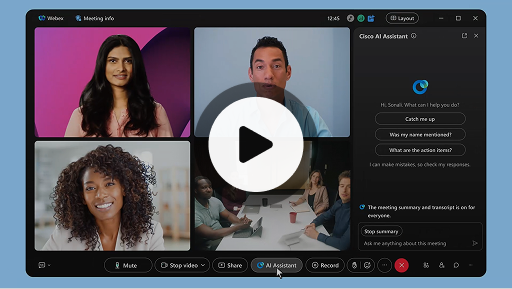
Assistant IA de Cisco au cours des réunions
Webex Suite
Il peut arriver que vous rejoigniez une réunion en retard, que vous ayez besoin de vous absenter un instant ou que vous soyez distrait en raison de vos activités multitâches. Grâce aux résumés de réunion de l’assistant IA, vous pouvez rapidement rattraper ce que vous avez manqué, comprendre la discussion, poser des questions sans perturber la réunion et rester au fait de la conversation. Vous recevez également un résumé et une transcription après la réunion, sans avoir à l’enregistrer.
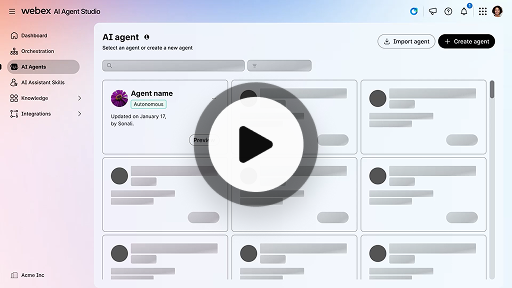
Créer un agent d’IA autonome
Expérience client
Les agents IA autonomes fonctionnent de manière indépendante, sans intervention humaine directe. Les agents autonomes peuvent accéder à un référentiel de connaissances et l’utiliser pour fournir des réponses informatives et précises aux questions des utilisateurs. Ces agents utilisent des algorithmes avancés et des techniques d’apprentissage automatique pour analyser les données, tirer des enseignements de leur environnement et adapter leurs actions afin d’atteindre des objectifs précis.
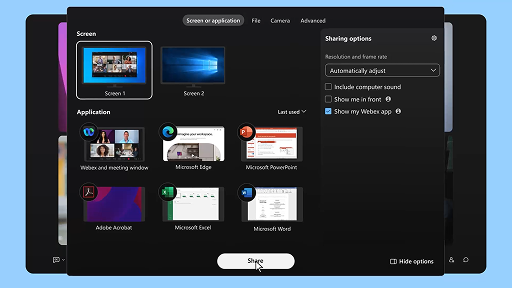
Partager du contenu pendant une réunion
Webex Suite
Lorsque vous partagez du contenu dans l’application Webex, tous les participants à la réunion peuvent facilement voir les sujets de discussion. Tout le monde peut partager du contenu, mais une seule personne peut le faire à la fois.
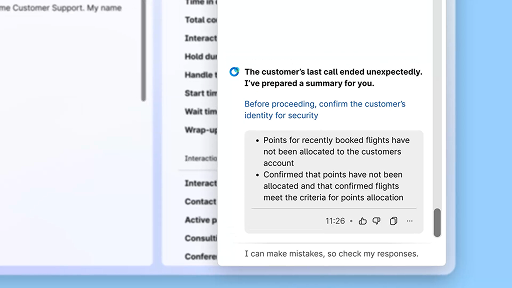
Améliorer l’efficacité en utilisant les sommaires générés par l’IA
Expérience client
Cisco AI Assistant propose des sommaires concis des interactions précédentes, ce qui permet aux agents de reprendre facilement la conversation, sans avoir à recueillir à nouveau les informations. Cet accès immédiat permet aux agents de se concentrer sur la mise en place de solutions efficaces, ce qui se traduit par des résolutions plus rapides et une expérience client plus cohérente.
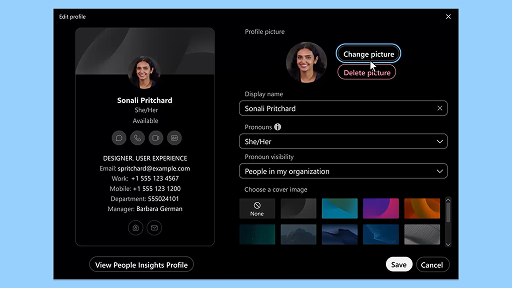
Application Webex | Ajouter votre photo de profil
Webex Suite
Aidez les personnes à vous reconnaitre dans l’application Webex en ajoutant une photo à votre profil. Jusqu’à ce que vous en ayez chargé une, votre profil affiche uniquement vos initiales dans un cercle.
Notifications de pause détente par AI Assistant
Expérience client
Lorsqu’AI Assistant recommande une pause bien-être, une notification toaster s’affiche : Accepter une pause : Acceptez la pause en cliquant sur Faire une pause. Le widget Cisco AI Assistant s’ouvre automatiquement pour confirmer votre choix. Une fois votre interaction en cours terminée, votre pause bien-être d’une minute commence automatiquement. Votre statut passe à Pause bien-être, afin d’empêcher que la prochaine interaction ne vous soit attribuée. Un compte à rebours de 5 secondes s’affiche à l’écran à la fin de votre pause d’une minute. Une fois fini, la fenêtre de pause se ferme automatiquement et votre statut passe à Disponible, vous permettant ainsi d’être prêt pour la prochaine interaction.
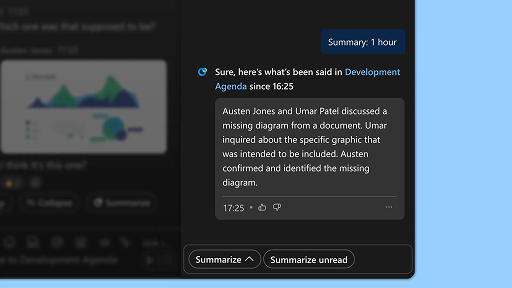
Générer des résumés des espaces
Webex Suite
Lorsque vous êtes occupé ou que vous vous êtes absenté du bureau, il peut s’avérer difficile de rattraper tout ce qui s’est passé dans vos espaces. L’assistant IA peut générer des résumés d’espace pour vous aider à rattraper rapidement les messages et conversations manqués dans l’espace. Restez informé des décisions et des points forts, et restez au fait de la discussion en un coup d’œil.
Améliorer l’efficacité grâce aux transcriptions en temps réel
Expérience client
Les transcriptions en temps réel sont conçues pour vous aider à optimiser l’efficacité de la communication lors de vos interactions avec les clients. En proposant des transcriptions en temps réel directement sur votre Agent Desktop, cette fonctionnalité peut vous aider à améliorer votre concentration, votre clarté et la précision de vos réponses. Elle vise à améliorer votre compréhension et votre efficacité lors des appels, à réduire les malentendus et à vous aider à offrir des interactions de grande qualité qui améliorent les performances et la satisfaction des clients.
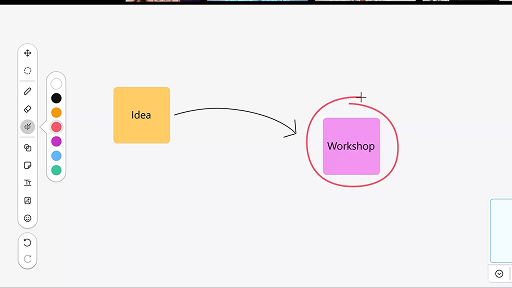
Utilisation du tableau blanc en réunion
Webex Suite
Lorsque vous êtes occupé ou que vous vous êtes absenté du bureau, il peut s’avérer difficile de rattraper tout ce qui s’est passé dans vos espaces. L’assistant IA peut générer des résumés d’espace pour vous aider à rattraper rapidement les messages et conversations manqués dans l’espace. Restez informé des décisions et des points forts, et restez au fait de la discussion en un coup d’œil.
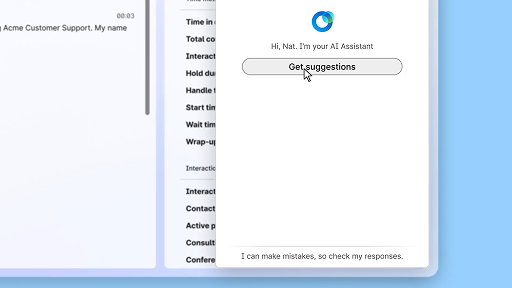
Répondre en toute confiance grâce à l’assistance en temps réel
Expérience client
L’assistance en temps réel est une fonctionnalité de Cisco AI Assistant conçue pour vous aider lors des interactions en direct avec les clients, en analysant en permanence le contexte de la conversation, en identifiant les intentions du client et en proposant instantanément des recommandations pertinentes. Elle vous guide en temps réel en vous suggérant quoi dire ou quoi faire, en vous aidant à naviguer les procédures complexes et même en lançant automatiquement des processus.
Assistant IA de Cisco au cours des réunions
Webex Suite
Il peut arriver que vous rejoigniez une réunion en retard, que vous ayez besoin de vous absenter un instant ou que vous soyez distrait en raison de vos activités multitâches. Grâce aux résumés de réunion de l’assistant IA, vous pouvez rapidement rattraper ce que vous avez manqué, comprendre la discussion, poser des questions sans perturber la réunion et rester au fait de la conversation. Vous recevez également un résumé et une transcription après la réunion, sans avoir à l’enregistrer.
Créer un agent d’IA autonome
Expérience client
Les agents IA autonomes fonctionnent de manière indépendante, sans intervention humaine directe. Les agents autonomes peuvent accéder à un référentiel de connaissances et l’utiliser pour fournir des réponses informatives et précises aux questions des utilisateurs. Ces agents utilisent des algorithmes avancés et des techniques d’apprentissage automatique pour analyser les données, tirer des enseignements de leur environnement et adapter leurs actions afin d’atteindre des objectifs précis.
Partager du contenu pendant une réunion
Webex Suite
Lorsque vous partagez du contenu dans l’application Webex, tous les participants à la réunion peuvent facilement voir les sujets de discussion. Tout le monde peut partager du contenu, mais une seule personne peut le faire à la fois.
Améliorer l’efficacité en utilisant les sommaires générés par l’IA
Expérience client
Cisco AI Assistant propose des sommaires concis des interactions précédentes, ce qui permet aux agents de reprendre facilement la conversation, sans avoir à recueillir à nouveau les informations. Cet accès immédiat permet aux agents de se concentrer sur la mise en place de solutions efficaces, ce qui se traduit par des résolutions plus rapides et une expérience client plus cohérente.
Application Webex | Ajouter votre photo de profil
Webex Suite
Aidez les personnes à vous reconnaitre dans l’application Webex en ajoutant une photo à votre profil. Jusqu’à ce que vous en ayez chargé une, votre profil affiche uniquement vos initiales dans un cercle.
Notifications de pause détente par AI Assistant
Expérience client
Lorsqu’AI Assistant recommande une pause bien-être, une notification toaster s’affiche : Accepter une pause : Acceptez la pause en cliquant sur Faire une pause. Le widget Cisco AI Assistant s’ouvre automatiquement pour confirmer votre choix. Une fois votre interaction en cours terminée, votre pause bien-être d’une minute commence automatiquement. Votre statut passe à Pause bien-être, afin d’empêcher que la prochaine interaction ne vous soit attribuée. Un compte à rebours de 5 secondes s’affiche à l’écran à la fin de votre pause d’une minute. Une fois fini, la fenêtre de pause se ferme automatiquement et votre statut passe à Disponible, vous permettant ainsi d’être prêt pour la prochaine interaction.
Générer des résumés des espaces
Webex Suite
Lorsque vous êtes occupé ou que vous vous êtes absenté du bureau, il peut s’avérer difficile de rattraper tout ce qui s’est passé dans vos espaces. L’assistant IA peut générer des résumés d’espace pour vous aider à rattraper rapidement les messages et conversations manqués dans l’espace. Restez informé des décisions et des points forts, et restez au fait de la discussion en un coup d’œil.
Améliorer l’efficacité grâce aux transcriptions en temps réel
Expérience client
Les transcriptions en temps réel sont conçues pour vous aider à optimiser l’efficacité de la communication lors de vos interactions avec les clients. En proposant des transcriptions en temps réel directement sur votre Agent Desktop, cette fonctionnalité peut vous aider à améliorer votre concentration, votre clarté et la précision de vos réponses. Elle vise à améliorer votre compréhension et votre efficacité lors des appels, à réduire les malentendus et à vous aider à offrir des interactions de grande qualité qui améliorent les performances et la satisfaction des clients.
Utilisation du tableau blanc en réunion
Webex Suite
Lorsque vous êtes occupé ou que vous vous êtes absenté du bureau, il peut s’avérer difficile de rattraper tout ce qui s’est passé dans vos espaces. L’assistant IA peut générer des résumés d’espace pour vous aider à rattraper rapidement les messages et conversations manqués dans l’espace. Restez informé des décisions et des points forts, et restez au fait de la discussion en un coup d’œil.
Répondre en toute confiance grâce à l’assistance en temps réel
Expérience client
L’assistance en temps réel est une fonctionnalité de Cisco AI Assistant conçue pour vous aider lors des interactions en direct avec les clients, en analysant en permanence le contexte de la conversation, en identifiant les intentions du client et en proposant instantanément des recommandations pertinentes. Elle vous guide en temps réel en vous suggérant quoi dire ou quoi faire, en vous aidant à naviguer les procédures complexes et même en lançant automatiquement des processus.

Explorez nos outils d’apprentissage

Adoption Hub
Launch, train, and grow with these helpful resources.

Webex Academy
Apprenez à tout moment grâce à des cours à votre rythme et à des tutoriels vidéo rapides.

Onboarding resources
Make onboarding easy with customizable self-serve resources.

Événements en direct
Apprendre avec Webex : événements, webinaires et démonstrations quotidiennes.
Autres ressources

Télécharger Webex
Une seule plateforme, offrant tous les moyens de se connecter.


Communauté Webex
La communauté constitue un pôle de connexion avec vos pairs et les spécialistes de Cisco pour demander de l’aide, partager votre expertise, créer votre réseau et vous développer professionnellement.

Webex Insider
Entrez en contact avec des personnes qui partagent votre passion pour Webex et bénéficiez d’un accès privilégié aux nouveaux concepts des équipes chargées des produits et de l’expérience de la gamme Webex.

Webex pour les développeurs
Construisez l’avenir de la collaboration professionnelle avec Webex. En savoir plus sur l’API et les SDK Webex pour créer la prochaine grande application de collaboration sur la plateforme Webex.

Vous avez encore besoin d’aide ?
Choisissez parmi une variété de ressources d’assistance pour obtenir l’aide dont vous avez besoin.
Comment évalueriez-vous votre expérience sur cette page ?


Non utile
Utile
Comment pourrions-nous rendre cette page plus utile pour vous ?
Merci pour votre commentaire.


